Improved manual sync
Once you select a gpx file, in the next step, above the activity chart you can select a video file that will help you to pick the right timeframe from your activity.
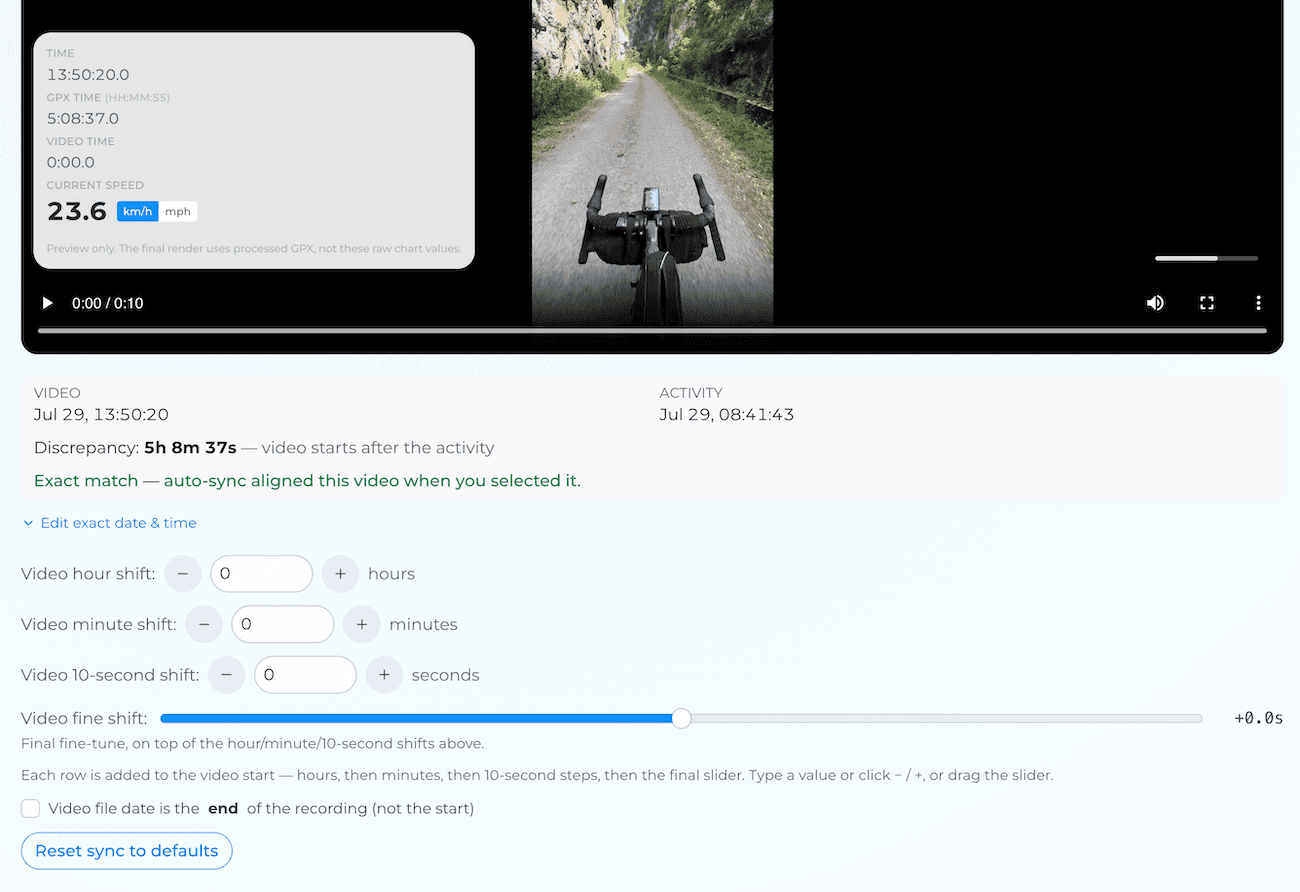
If there is an exact match, you will be notified and you will see information: "Exact match - auto-sync already selected a correct timeframe. Fine tune if needed".
If there is partial match or no match, you can use the controls to pick the right timeframe.
Over the video there is a preview showing the offset and approximate speed from the moment. The speed is preview only, it will be smoother in the final render.
Controls:
- Hour, minute, and 10-second shifts — type a value or click − / +.
- Fine shift — the last fraction of a second, in 0.5 s steps, on top of the shifts above.
- Edit exact date & time — sometimes, when there is huge mismatch due to timezone or wrong camera time, you can put the exact time and fine tune with other controls.
- Reset sync to defaults — reset to the timing from when you picked the file.
Hope that improvement will help you. Contact with me if you have any questions or feedback.
Tutorial: syncing your overlay with the video
Line Up Your VideoSelect your video and shift the start until it overlaps the activity.
View Pricing Options